
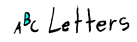
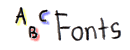
This is a blinkie tutorial that will show you step by step how to make your own blinkies on Paint Shop Pro 7.0. The first step is to save these 8 letters to your desktop so you can do the example:


1). Open Paint Shop Pro animation shop: File/Jasc Software Products/Launch Animation Shop.
2). Click File/New. A screen comes up that looks like this:

Chose transparent background. For this example we're using a blinkie that is width 50 and height 10, so set your width and height to 50/10.












Here is an "absolute" box, which stays at the col bottom.
AP again. The side cols have bottom padding to avoid these boxes.